
Introduction
You can connect your own WhatsApp Business number to Privyr to automatically import contacts to Privyr whenever a new WhatsApp conversation is initiated by you or a lead. This automatically creates the leads in your Client List so you can automatically keep track of them.
As a verified Meta Business Partner, Privyr’s WhatsApp Contact Import works through WhatsApp’s official APIs, keeping your WhatsApp account and data safe while complying with WhatsApp’s Terms of Service.
Setting Up WhatsApp Contact Import
To start using WhatsApp Contact Import, simply connect your WhatsApp Business number to Privyr through your Facebook account. The setup process only takes around 5 to 10 minutes.
To set up and use WhatsApp Contact Import, you need: a Privyr subscription, a Facebook account, and a phone number logged into the WhatsApp Business App.
Steps to Connect:
- On the Web version of Privyr, go to the WhatsApp Contact Import setup page under your Automations tab > WhatsApp > WhatsApp Contact Import
- Click CONNECT WHATSAPP NUMBER to get started
- Follow the guide on Connecting your WhatsApp Business number to Privyr to complete your setup
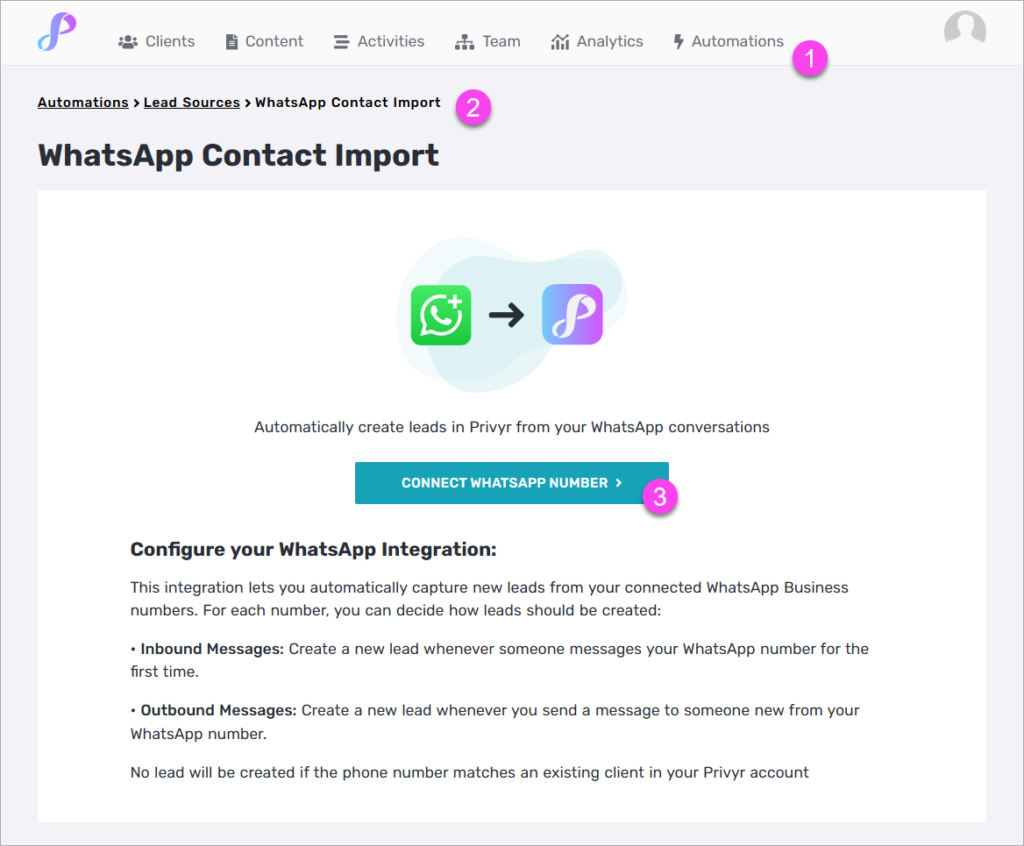
Once you’ve completed the steps, you can decide how leads should be created in Privyr for each WhatsApp Business number:
• Inbound Messages: Create a new lead whenever someone messages your WhatsApp number for the first time.
• Outbound Messages: Create a new lead whenever you send a message to someone new from your WhatsApp number.
Note that no lead will be created if the phone number matches an existing client in your Privyr account.
Managing your WhatsApp Connection
Refer to the relevant sections in our Using WhatsApp Business Automations with Privyr guide for detailed steps on disconnecting or troubleshooting your WhatsApp Business number.